Salesforce Implementation Guide: What to Do Before, During, and After Go-Live
A well-executed Salesforce implementation can increase revenue by 37 percent and improve team productivity by 44 percent. A poorly planned one becomes an expensive exercise in organizational frustration. The difference between the two is rarely about the platform. It is almost always about the quality of preparation before the first sprint and the discipline of follow-through after the go-live celebration ends.
This guide covers the full lifecycle in practical terms, with specific actions for each phase and the reasoning behind why each one matters.
Before Go-Live: The Phase That Determines Everything Else
The work you do before a single Salesforce field is configured determines the quality of what gets built, how fast it gets built, and whether your team will actually use it.
Most organizations spend less time on pre-implementation planning than on any other phase. This is backwards. The before phase is where project success is made or lost.
Define What Success Looks Like in Specific Numbers
The first thing to agree on is what Salesforce needs to accomplish, in measurable terms, before any configuration work begins. Vague goals produce misaligned implementations. If your success criteria is "better visibility into the sales pipeline," nobody can tell you whether the project succeeded six months from now.
Write three to five specific outcomes you expect Salesforce to deliver. Examples include reducing average deal close time from 38 to 25 days, achieving 85 percent call logging compliance within 60 days of launch, or cutting case resolution time from 4.2 days to 2 days. These numbers become the yardstick for every configuration decision. If a feature does not move one of these numbers, it probably does not belong in the first phase.
Audit and Clean Your Data Before Migration
Salesforce only performs as well as the data you put into it. Organizations that migrate years of duplicate contacts, incomplete accounts, and inconsistent field values end up with a system that users do not trust. A system users do not trust is a system users stop using.
Before any data migration begins, audit every source system. Remove duplicate records. Standardize field values across sources. Decide which records are worth migrating and which can be archived. This process takes longer than most organizations expect, and cutting it short is one of the most common and most damaging shortcuts in a Salesforce CRM implementation.
Map Your Process, Then Configure Salesforce Around It
Salesforce has default pipeline stages, default contact record structures, and default report types. These defaults work well for generic businesses. If your sales process does not match the generic, configure Salesforce to match your actual process, not the other way around.
Document each stage of your sales or service process in writing before the implementation partner touches the sandbox. Who owns each stage? What information needs to be captured before moving to the next stage? What are the handoff points between teams? This documentation becomes the blueprint for configuration and prevents the scope creep that derails most projects mid-flight.
The before phase is not administrative overhead. It is the foundation that determines whether configuration produces a system people use or a system that works on paper.
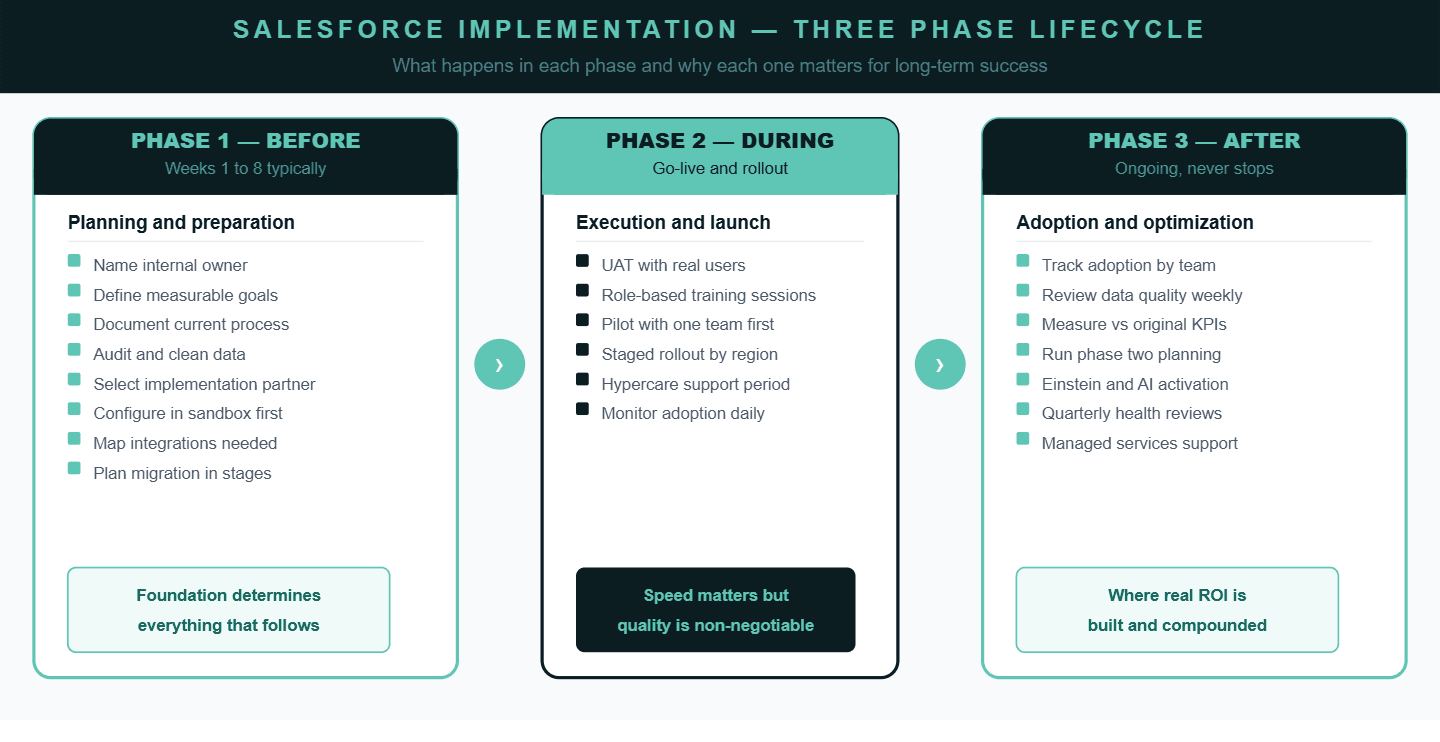
During Go-Live: Where Preparation Gets Tested
The go-live phase is where all the planning decisions either pay off or expose their weaknesses. There are four things that separate a clean go-live from a chaotic one.
Always build and test in a sandbox environment first.
No exceptions. Every configuration change, every workflow, every integration should be built and validated in a sandbox before it touches the production environment. Organizations that skip this step discover problems in front of their users, which damages trust in the system before adoption has had a chance to build.
Use a staged rollout rather than a full organization launch.
Start with one team or one region. The first group to go live will encounter edge cases that planning did not anticipate. Better to find those edge cases with twenty users than with two hundred. Use what you learn from the pilot group to refine the configuration and training materials before the broader rollout.
Train people on their specific role, not on Salesforce generally.
Sales representatives need to know how to log a call, progress an opportunity, and read their pipeline report. They do not need to understand how the underlying data model works. Customer service agents need to know how to open a case and escalate it. Generic Salesforce training produces low retention because it is not relevant to what people actually do in their job. Role-specific training, focused on the five things each person does most often, produces dramatically higher adoption rates.
Maintain a dedicated hypercare period for the first two to four weeks.
This is an intentionally intensive support window where the implementation team and internal owner are actively available to resolve issues, answer questions, and catch anything that was missed in testing. Hypercare is what prevents the first wave of confusion from turning into the long-term narrative that the system is broken.
A Salesforce go-live is not a finish line. It is the beginning of the adoption phase. The work during go-live is about building user confidence, not just switching systems.
After Go-Live: Where Most Organizations Walk Away Too Soon
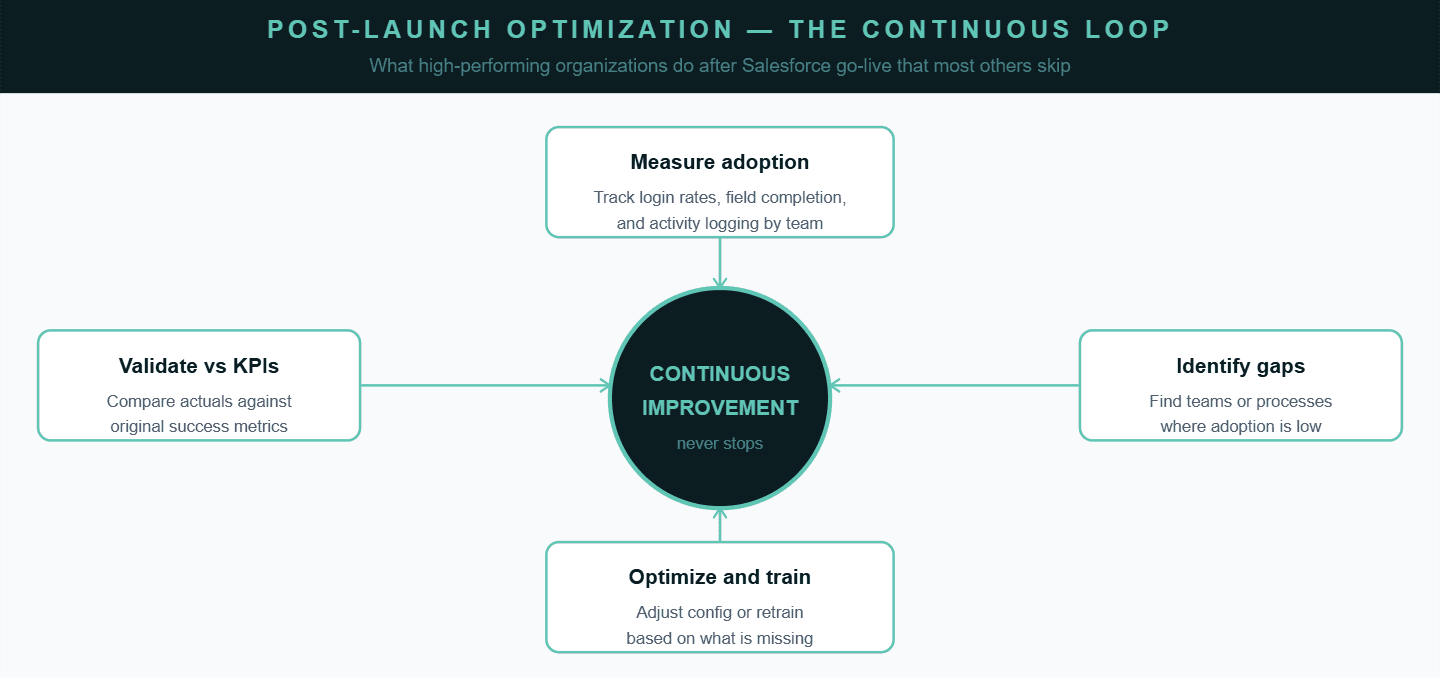
The work does not end when Salesforce goes live. It changes. What was a structured implementation phase becomes part of daily operations, and the success of the system now depends on how consistently teams use it. Many organizations reduce focus at this stage, assuming the difficult part is complete. In reality, this is where long-term success is either built or gradually lost.
The first priority after go-live is not performance but usage. Before measuring improvements in revenue or efficiency, it is important to understand whether the system is being used correctly. If users are not logging in regularly, updating opportunities, or maintaining accurate data, then performance metrics will not reflect reality. Strong CRM adoption is the foundation for everything that follows.
As teams begin using Salesforce in real scenarios, friction becomes visible. Some fields slow users down, certain workflows add unnecessary steps, and reports may not align with how teams think. These are signals that need immediate attention. Systems that adapt based on user feedback become easier to adopt, while rigid systems create resistance and are eventually bypassed.
Ownership and data discipline play a critical role in this phase. Salesforce requires clear accountability for maintaining data quality, managing changes, and ensuring consistency. Without this, small issues build over time and make the system harder to use. At the same time, clean and reliable data must be actively maintained. When users trust the data, they rely on the system. When they do not, adoption drops.
As the business evolves, the system must evolve with it. Workflows, reports, and processes should be reviewed regularly to ensure they still support decision-making and operations. The outcomes defined before implementation should also be revisited to measure real impact. If results are not improving, the gap needs to be addressed. Salesforce delivers value only when it continues to align with how the business operates after go-live.
Frequently Asked Questions
1. How long does a Salesforce implementation take?
A typical Salesforce implementation can take anywhere from 6 weeks to 6 months depending on business size, complexity, data migration requirements, and level of customization.
2. What is the biggest reason Salesforce implementations fail?
The most common reason is lack of alignment between business goals, processes, and system configuration, followed closely by poor user adoption.
3. How much does Salesforce implementation cost?
Costs vary widely based on scope, but typically include licensing, implementation partner fees, customization, integration, and ongoing support. Small projects may start in lakhs, while enterprise implementations can scale significantly higher.
4. What should be done before implementing Salesforce?
Before implementation, organizations should define clear goals, clean their data, map existing processes, and align stakeholders across teams.
5. Why is user adoption important in Salesforce?
Without consistent usage, even the best-configured CRM fails. Adoption ensures data accuracy, better reporting, and actual return on investment.
6. What is a Salesforce sandbox and why is it important?
A sandbox is a testing environment where configurations and changes can be safely built and tested before going live, preventing errors in the live system.
7. How can companies improve Salesforce adoption?
Adoption improves through role-based training, simplifying workflows, reducing manual effort, and continuously acting on user feedback.
8. What happens after Salesforce go-live?
After go-live, businesses must monitor adoption, maintain data quality, optimize workflows, and continuously align the system with evolving business needs.
9. Do I need a Salesforce consulting partner?
While not mandatory, a consulting partner helps avoid common mistakes, speeds up implementation, and ensures the system is aligned with business outcomes.
10. How do you measure Salesforce ROI?
ROI is measured through metrics like improved conversion rates, reduced sales cycle time, increased productivity, better reporting accuracy, and overall revenue growth.
Continue Exploring Salesforce Insights
For a deeper understanding of how expert guidance can shape your CRM success, explore our Salesforce consulting services guide for growing businesses.
If you’re planning or optimizing your Salesforce journey, these reads will help you go deeper:
https://p99soft.com/service/salesforce-strategy-consulting
https://p99soft.com/service/salesforce-implementation-integration
https://p99soft.com/service/salesforce-data-cloud
https://p99soft.com/service/salesforce-managed-services-evolution
Author Name - Mrunalini Wankhede