DevSecOps Pipeline: How to Add Security Gates to CI/CD Without Creating Bottlenecks
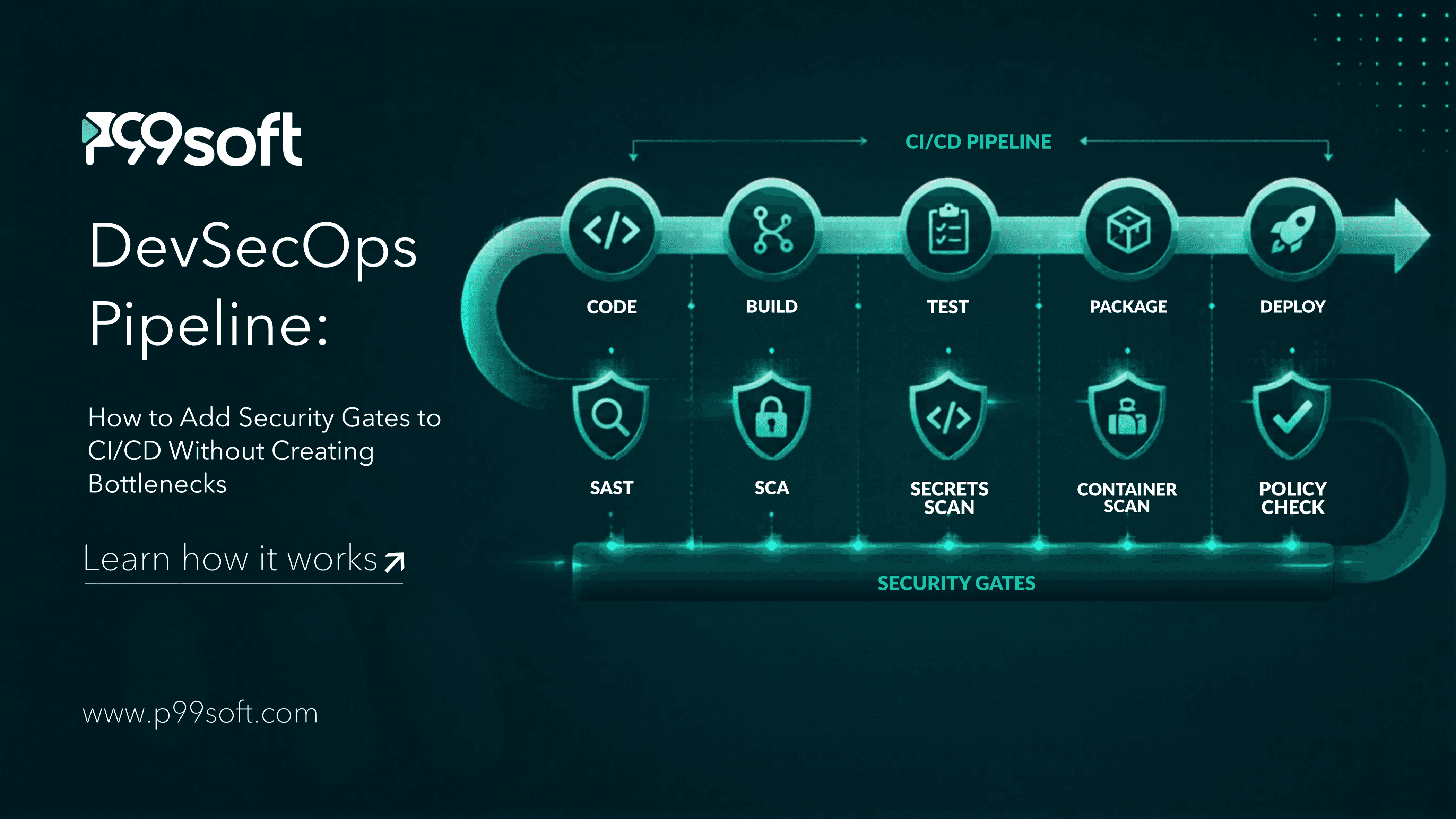
Adding security gates to a CI/CD pipeline without creating bottlenecks requires placing each security check at the stage where it runs fastest and catches the most relevant issues, running checks in parallel rather than sequentially, starting in report mode before enabling blocking behavior, and tuning false positive rates before the gates affect developer workflow. Security checks placed at the wrong pipeline stage add minutes of latency without improving security outcomes. Placement and parallelization together determine whether DevSecOps accelerates or slows delivery.
The objection engineering teams raise most consistently when DevSecOps comes up is speed. Adding security gates to a CI/CD pipeline sounds like adding waiting time to every deployment. If each security scan takes five minutes and you add four of them, that is 20 extra minutes on every build. At ten deployments a day, that is more than three hours of added waiting time across the team before a single vulnerability is found.
That objection is correct when security gates are implemented poorly. It disappears when they are implemented correctly.
According to a 2025 Gartner survey, companies implementing automated DevSecOps pipelines reported a 35% decrease in security incidents. The organizations achieving that reduction are not the ones who added a security scan to the end of their pipeline. They are the ones who placed each security control at the stage where it runs fastest, parallelized everything that could run simultaneously, and tuned their tools before enabling blocking behavior.
According to Sonatype's 2025 study, 96% of downloaded open-source components contain known vulnerabilities. The attack surface in a modern CI/CD pipeline is not hypothetical. CI/CD pipelines and software supply chains remain dangerously underprotected, even as attackers increasingly target them. GitHub Actions workflows routinely handle production credentials, generate release builds, and execute third-party code in highly privileged contexts, yet most organizations do not secure them with the same rigor they apply to production infrastructure.
The gap between the risk and the protection is what a well-designed DevSecOps pipeline closes. This guide covers exactly how to do that without the speed penalty that makes engineering teams resist it.
Why Security Gates Create Bottlenecks and How to Prevent It
Security gates create bottlenecks for three specific reasons, and each has a direct structural fix.
Scans run sequentially when they could run in parallel. A pipeline that runs secrets detection, then static analysis, then dependency scanning, then container scanning one after another adds the total duration of all four scans to every build. If each scan takes four minutes, the sequential pipeline adds 16 minutes. The same four scans running simultaneously add only the duration of the slowest one, typically four to six minutes. Parallelization is the single most impactful change for reducing security overhead, and it requires no compromise on what gets scanned.
Blocking behavior is enabled before false positive rates are tuned. Every security scanning tool produces false positives when first deployed against a new codebase. Rules designed for general use inevitably flag patterns that are legitimate in a specific organization's code. When blocking behavior is enabled on a tool with a high false positive rate, developers encounter blocks on legitimate code regularly. The response is predictable: they find workarounds, suppress rules broadly, or pressure the security team to reduce the gate's coverage. Enabling blocking only after tuning false positives to a low rate means the gates that block are trusted rather than resented.
Scans are placed at stages where they are too slow or too late. A DAST scan (Dynamic Application Security Testing, which tests a running application by sending it requests and analyzing responses) cannot run at the pull request stage because there is no running application to test. Running it there is impossible. Running it at the build stage wastes time. It belongs at the staging deployment stage where an application is actually running. A secrets detection scan, by contrast, is extremely fast and belongs at the commit stage where it catches credentials before they ever leave the developer's machine. Placing each scan at the correct stage for its speed and requirements is what makes the pipeline both fast and thorough.
In 2026, codifying security policies is mainstream. Teams now express rules as code applied with low friction and no human error. Automated policy gates ensure every code change or deployment is checked against security mandates before merge or deployment.
A DevSecOps pipeline that creates bottlenecks was designed with placement and sequencing as afterthoughts. Placement at the correct stage, parallel execution, and false positive tuning before blocking behavior are the three design decisions that make security gates fast enough to accept.
The Five Security Gates and Where Each Belongs in the Pipeline
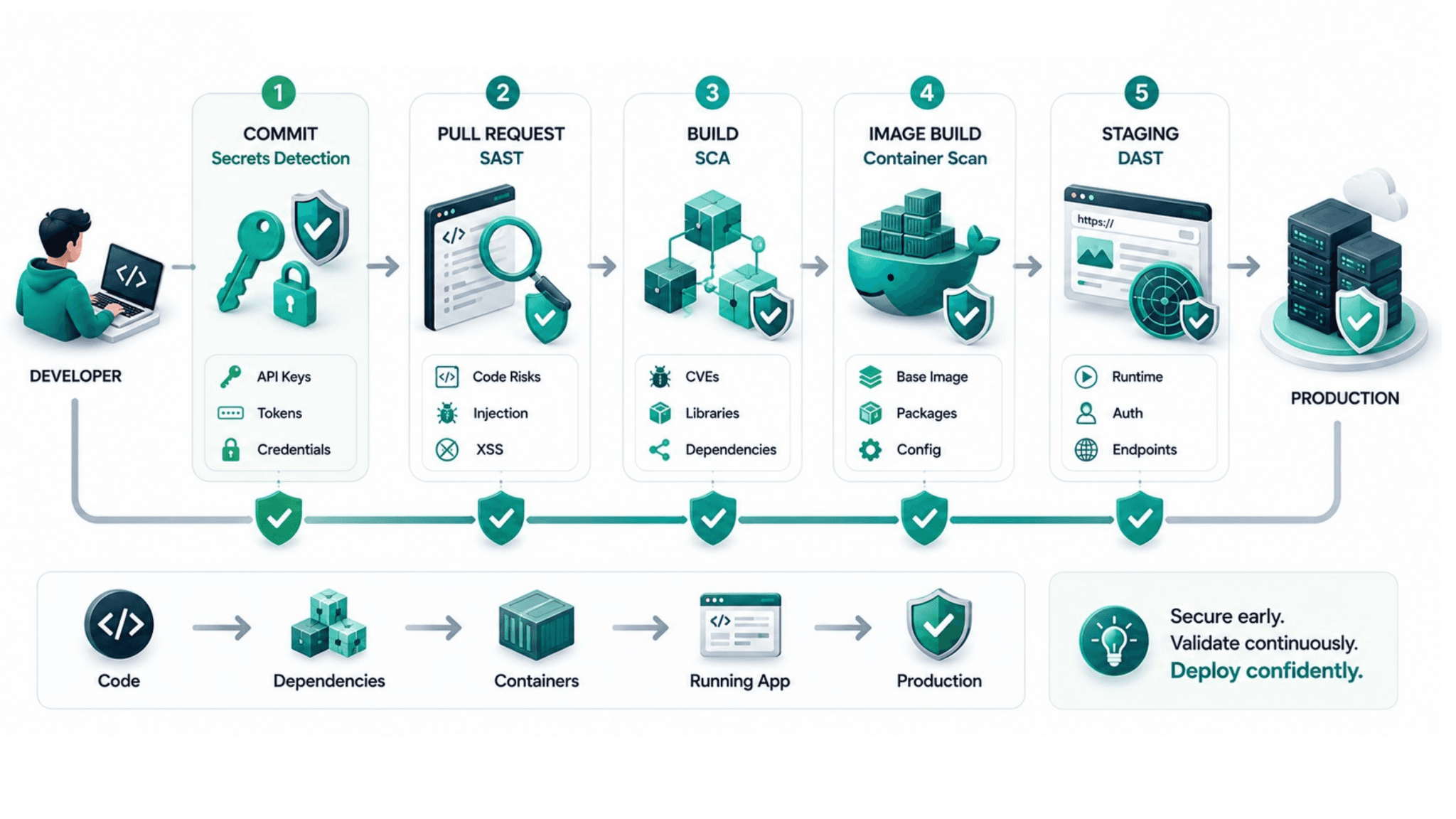
Each security gate belongs at a specific pipeline stage based on two criteria: what it needs to run (source code, built artifacts, a running application) and how fast it runs. Matching each gate to the right stage is what keeps the total added latency under five minutes for a well-designed pipeline.
Stage 1 — Commit: Secrets Detection
Secrets detection scans every commit for patterns matching credentials: API keys, database connection strings, private certificates, OAuth tokens, and cloud provider access keys. This scan is extremely fast, typically completing in under 30 seconds, and it belongs as close to the developer's keyboard as possible.
For disclosed web application infrastructure secrets, 66% are JWTs used for authentication and sessions. For cloud secrets, 43% are Google Cloud API keys. Credentials committed to version control are among the highest-severity, most frequently exploited vulnerabilities in production systems. They also have zero legitimate reason to exist in code: credentials belong in secrets managers, not in files.
Gitleaks and TruffleHog are the most widely adopted open-source tools for this gate. Both run in seconds and integrate with GitHub Actions, GitLab CI, and most other CI/CD systems without significant configuration. This is the gate that produces the fastest return on implementation effort because the finding rate on first deployment is almost always non-zero.
Stage 2 — Pull Request: Static Application Security Testing
SAST (Static Application Security Testing) analyzes source code without executing it, looking for security vulnerability patterns: SQL injection risks, cross-site scripting vulnerabilities, insecure deserialization, path traversal, and hardcoded sensitive values. It runs against source code at the pull request stage, posting results as PR comments so the developer who wrote the code receives the feedback immediately, before any reviewer sees the PR.
The PR stage is the correct placement because the developer who can most efficiently fix the issue is still in context with the code they wrote. A SAST finding on a PR takes minutes to address. The same finding discovered in a production security audit takes hours because the developer must re-enter the context of code written weeks earlier.
Semgrep and SonarQube are the most commonly deployed SAST tools. Both support a wide range of languages and allow rule customization to reduce false positives for organization-specific patterns. The critical configuration decision is starting with a conservative ruleset that produces high-confidence findings and expanding coverage as the team builds trust in the tool.
Stage 3 — Build: Software Composition Analysis
SCA (Software Composition Analysis) scans the third-party libraries and open-source dependencies your application uses against databases of known vulnerabilities. 96% of downloaded open-source components contain known vulnerabilities according to Sonatype's 2025 study. The build stage is the correct placement because the dependency lock file exists and is resolved at build time, giving SCA accurate information about exactly which versions are in use.
The SCA gate should block on critical vulnerabilities with known fixes. A critical CVE in a library that has a patched version available is a solvable problem that should not reach production. High-severity findings should generate warnings that engineers review before merge. Medium and low findings belong in a scheduled review queue rather than in the active blocking path.
Snyk, OWASP Dependency-Check, and Trivy's dependency scanning mode are the leading tools in this category. The policy decision about which severity levels block versus warn is the most important configuration choice for this gate. Setting it too aggressively on initial deployment blocks builds on findings that require significant remediation time, which produces pushback. Setting it too conservatively means the gate provides no protection.
Stage 4 — Image Build: Container Security Scanning
Container image scanning checks the Docker images your application runs in for vulnerabilities in the base image, the packages installed in the image layers, and the application layers built on top. This gate belongs at the image build stage, before the image is pushed to the registry.
The base image is the most frequently overlooked attack surface. An application that has no vulnerability findings in its own code can still run in a container whose base image carries dozens of critical CVEs. Major GitHub Actions compromises of 2025 made clear that attackers systematically target pipeline infrastructure, not just application code. Container images that have not been scanned are a direct path into production infrastructure.
Trivy is the most widely adopted open-source container scanning tool. It covers OS packages, language-specific dependencies within the image, and infrastructure-as-code misconfigurations. The severity policy should match the SCA gate: block on critical with known fixes, warn on high, report on medium and low.
Stage 5 — Staging Deployment: Dynamic Application Security Testing
DAST tests a running application by sending it requests that simulate attack patterns and analyzing the responses. Unlike SAST, which reads code statically, DAST requires a running application to test. This makes it incompatible with earlier pipeline stages where no running application exists.
The staging deployment stage is the correct placement. The application is running in a production-like environment. DAST can exercise the actual HTTP endpoints, test authentication boundaries, check for injection vulnerabilities in running functionality, and validate that security headers are present in responses. OWASP ZAP is the most commonly deployed open-source DAST tool and integrates with most CI/CD systems through a pipeline job that triggers after successful deployment to staging.
DAST is the slowest of the five gates and the most likely to surface findings that require architectural investigation rather than a simple code fix. Running it at staging rather than production means vulnerabilities are found before they are exposed to real users.
The Parallel Pipeline Architecture That Keeps Total Overhead Under Five Minutes
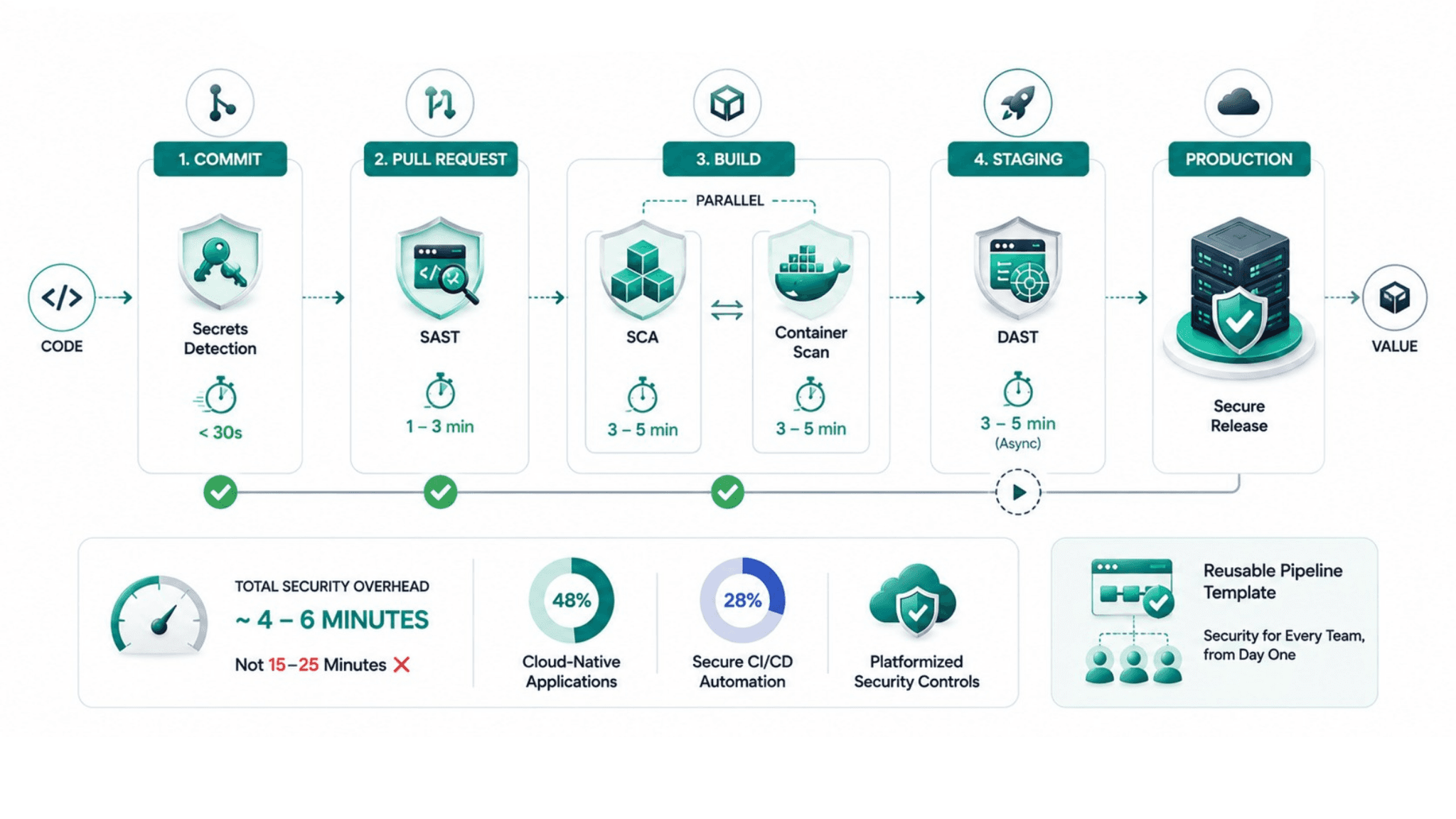
A sequentially structured security pipeline that runs all five gates one after another would add 15 to 25 minutes to every build depending on codebase size and scan depth. The parallel architecture reduces that to the duration of the slowest gate at each stage, typically four to six minutes across the pipeline.
The structure looks like this. At the commit stage, secrets detection runs alone because it is fast and must complete before the PR is created. At the PR stage, SAST runs as the only check because it operates on source code before an artifact exists. At the build stage, SCA and container scanning run simultaneously: both operate on artifacts produced by the build, both can start at the same time, and neither depends on the output of the other. At the staging deployment stage, DAST runs after successful deployment.
This architecture produces a total security overhead of approximately four to six minutes: a few seconds for secrets detection, one to three minutes for SAST on the PR, three to five minutes for the parallel SCA and container scan at build, and DAST running asynchronously at staging without blocking the deployment itself.
48% of the DevSecOps market is driven by cloud-native applications and 28% by secure CI/CD automation. The shift toward platformized controls means security rules are encoded as gates applied consistently, not managed through side conversations or manual review processes.
Platform teams that implement these gates as reusable pipeline templates make the architecture available to every product team without requiring each team to configure security scanning independently. A new service that inherits the platform's pipeline template gets all five security gates from the first commit, without any security-specific work by the team that owns the service.
P99Soft's DevSecOps Consulting practice implements this parallel gate architecture as part of the CI/CD pipeline design, tuned to each organization's codebase language mix, severity thresholds, and compliance requirements. The gates are configured in report mode first, validated against the existing codebase, false positives tuned, and blocking behavior enabled only after the engineering team has reviewed the initial findings and is confident in the signal quality.
Starting in Report Mode: The Step Most Teams Skip
Report mode means the security gate runs, produces findings, and logs results without blocking the pipeline. The build continues regardless of what the scan finds. No developer is blocked. No deployment is halted.
Running in report mode for two weeks before enabling blocking behavior accomplishes three things that determine whether the gate is trusted long-term.
It shows the team the actual finding rate on the existing codebase without surprising them with blocks at a moment of deadline pressure. A SAST tool that would have blocked 40 builds in the first two weeks under blocking mode is a SAST tool that gets turned off or suppressed broadly when it is enabled in blocking mode without warning. Seeing those findings in report mode gives the team time to assess which are real vulnerabilities, which are false positives that need rule tuning, and which require remediation before blocking is enabled.
It identifies the false positives that need to be addressed before blocking mode goes live. A rule that fires on a test fixture, a generated file, or a pattern that is legitimate in the organization's specific architecture needs to be excluded from the blocking ruleset. Finding and addressing these in report mode is far less disruptive than discovering them when they block a deployment to production.
It builds the security team's credibility with the engineering team before the gates have the power to stop work. Engineering teams that have seen report mode findings, participated in reviewing them, and contributed to rule tuning are far more receptive to blocking mode than teams that wake up one morning to find their builds are blocked by a tool nobody told them about.
The Observability Implementation and Prometheus Consulting practices connect to the DevSecOps pipeline through security-relevant metrics surfaced in the same observability stack as reliability metrics. Scan result trends, false positive rates, mean time to remediate findings by severity, and vulnerability discovery rate over time all belong in the engineering team's operational dashboards alongside deployment frequency and error rates.
Policy as Code: Making Security Requirements Structural
Policy as code is the practice of expressing security and compliance requirements as machine-executable rules that run automatically on every pipeline execution. In 2026, codifying security policies is mainstream. Teams express rules as code, applied with low friction and no human error. Automated policy gates ensure every code change or deployment is checked against security mandates before merge or deployment.
Open Policy Agent and Sentinel are the two most widely used policy-as-code engines for CI/CD environments. Both allow security teams to write rules that evaluate infrastructure configuration, container image scan results, dependency audit outputs, or any other structured data that the pipeline produces, and make a blocking or warning decision based on whether those rules are satisfied.
The practical value of policy as code over manual security review is scale. A security team that manually reviews ten infrastructure PRs per week is a bottleneck for any engineering organization deploying more frequently than that. The same security requirements expressed as automated policy rules run against every change in every repository without any reviewer time. The security team defines the policies once. Enforcement scales automatically.
Specific policies worth encoding for most enterprise pipelines include: no container images deployed without a scan result from within the last 30 days, no deployment to production environments without a passing SCA result at the current dependency versions, no secrets in environment variables or deployment manifests, and no images built on base images with known critical CVEs.
The Grafana Solutions practice connects policy compliance results to operational dashboards. Compliance rate over time, policy violations by team, and the distribution of finding severity across the codebase are the metrics that give security and engineering leadership shared visibility into security posture trends without requiring security team members to manually compile reports.
Our blog on What Is DevSecOps? covers the foundational shift-left principles that underpin the pipeline architecture described in this article, including why vulnerability costs are six times lower at the commit stage than in production.
Supply Chain Security: The Gate Most Organizations Are Missing in 2026
Software supply chain attacks are the fastest-growing category of pipeline security threat. Software supply chain attacks are projected to cause $80 billion annually in damages by 2026. The attack surface is the pipeline itself: the CI/CD system, the third-party actions and plugins the pipeline uses, the container base images pulled from public registries, and the open-source libraries the application depends on.
Three specific supply chain security controls belong in every enterprise DevSecOps pipeline in 2026.
Dependency pinning means every third-party dependency, including CI/CD pipeline actions, uses a specific version rather than a floating reference to the latest version. A pipeline action that always pulls the current latest version is vulnerable to the attack pattern where a legitimate action is compromised and the next release contains malicious code. Pinning to a specific, reviewed version prevents that class of attack.
SBOM generation (Software Bill of Materials: a complete inventory of every component in an application, including version, license, and known vulnerabilities) produces a machine-readable record of everything in a build. When a new CVE is disclosed, the SBOM tells the security team immediately which applications and which versions are affected. Without an SBOM, the question "are we affected by this CVE" requires checking every application's dependencies manually.
Pipeline credential management addresses the specific risk that CI/CD pipelines handle production-level credentials to deploy to real environments. Credentials stored as long-lived secrets in the CI/CD system represent a permanent compromise risk if the CI/CD system is attacked. Workload identity federation, where the pipeline authenticates to cloud providers using short-lived tokens tied to the pipeline's identity rather than long-lived keys, eliminates this risk entirely for major cloud providers.
FAQ
What are security gates in a DevSecOps pipeline?
Security gates are automated checks integrated into a CI/CD pipeline that evaluate code, dependencies, container images, or application behavior against security requirements and either block the pipeline on failure or produce findings for review. Each gate type runs at a specific pipeline stage where it is most effective: secrets detection at the commit stage, static code analysis at the pull request stage, dependency scanning and container image scanning at the build stage, and dynamic application testing at the staging deployment stage. Companies implementing automated DevSecOps pipeline gates report a 35% decrease in security incidents.
How do you add security gates without slowing down CI/CD delivery?
The two most impactful practices are running security gates in parallel rather than sequentially, and placing each gate at the correct pipeline stage for its speed and requirements. Secrets detection takes seconds and runs at commit. SAST runs at the pull request stage. Dependency scanning and container scanning run simultaneously at the build stage. DAST runs asynchronously at staging. This architecture adds four to six minutes of total security overhead rather than 15 to 25 minutes from sequential execution. Starting each gate in report mode before enabling blocking behavior also prevents the false positive problems that create developer resistance.
What is the difference between SAST and DAST in DevSecOps pipelines?
SAST (Static Application Security Testing) analyzes source code without executing it, looking for vulnerability patterns in the code itself. It runs at the pull request stage because it only needs source code. DAST (Dynamic Application Security Testing) tests a running application by sending it attack-pattern requests and analyzing the responses. It requires a running application and runs at the staging deployment stage. Both are necessary because they catch different vulnerability classes: SAST finds insecure code patterns before the application runs, DAST finds vulnerabilities that only manifest in running application behavior.
How do you prevent false positives from blocking legitimate builds in a DevSecOps pipeline?
The structured approach is to run every new security gate in report mode for two weeks before enabling blocking behavior. During the report mode period, the team reviews all findings, identifies rules that are firing on legitimate code patterns specific to the organization's codebase, and tunes those rules out of the blocking ruleset. Blocking is enabled only on rules the team has reviewed and confirmed to produce high-confidence findings. This process produces a blocking gate that engineers trust because they have seen it validated against their specific codebase rather than encountering blocks from a generic ruleset that was never tuned.
Author Name - Mrunalini Wankhede